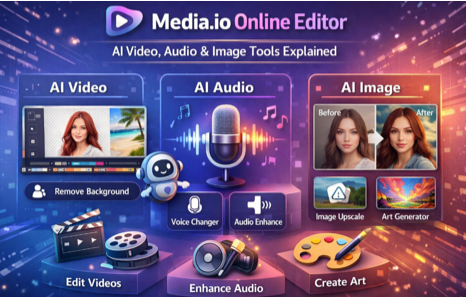
Media.io Online Editor – AI Video, Audio & Image Tools Explained
The way digital content is created has changed dramatically over the last few years. What once required powerful computers, expensive software, and professional skills can now be done directly in a web browser with the help of artificial intelligence. Among the platforms leading this shift is Media.io, an online editor designed to simplify video, audio, and image editing for everyday users as well as professionals who value speed and efficiency.
This article takes a fresh, human-written approach to explaining Media.io—how it works, what makes it different, who it’s best for, and why it has become popular among creators, businesses, and educators. If you are looking for an easy yet powerful AI-driven editing solution, this guide will help you understand whether Media.io fits your needs.
The Rise of Online AI Media Editors
Traditional editing tools often come with a steep learning curve. Video timelines, audio layers, codecs, plugins, and export settings can overwhelm beginners. Even experienced editors sometimes want faster ways to handle simple tasks like trimming a video, cleaning up audio, or resizing images.
Online AI editors like Media.io focus on automation and accessibility. Instead of asking users to “edit like professionals,” they aim to deliver professional results with minimal effort. This shift has opened the door for:
- Small businesses creating marketing content
- Teachers recording and editing lectures
- Bloggers optimizing images and videos
- Social media creators producing content daily
Media.io fits perfectly into this new ecosystem.
What Makes Media.io Different?
Media.io is not just another online converter or editor. Its key strength lies in combining multiple AI-powered media tools under one platform, eliminating the need to juggle different websites or software.
One Platform, Multiple Media Types
With Media.io, users can work on:
- Video (editing, compression, subtitles, enhancement)
- Audio (noise removal, voice clarity, format conversion)
- Images (resizing, compression, AI enhancement)
This “one dashboard” approach saves time and simplifies workflows.
AI Video Editing: Fast, Practical, and Purpose-Driven
Media.io’s video tools are designed with practicality in mind. Instead of complex timelines, the platform focuses on task-based editing.
Key Video Capabilities
- Trim and cut unwanted parts
- Crop videos for social media formats
- Merge multiple clips into one
- Convert videos to popular formats
- Add subtitles automatically using AI
- Reduce background noise in video audio
- Compress videos without major quality loss
These features are especially useful for short-form videos, tutorials, presentations, and marketing clips. The AI handles the technical complexity while users focus on the content.
Audio Editing with AI: Clean Sound Without a Studio
Good audio quality is critical, whether you’re recording a podcast, voice-over, or online class. Media.io’s audio tools are built for people who don’t have professional microphones or soundproof rooms.
What You Can Do with Media.io Audio Tools
- Remove background noise automatically
- Enhance voice clarity
- Normalize volume levels
- Convert audio formats easily
- Extract audio from video files
These features make Media.io popular among educators, YouTubers, and small businesses that need clean audio quickly.
Image Editing & Optimization: Simple but Effective
Images play a major role in digital marketing and SEO. Media.io offers lightweight but effective image tools that focus on optimization rather than advanced graphic design.
Image Features at a Glance
- Resize images for websites and social media
- Compress images to improve page speed
- Convert formats like JPG, PNG, and WEBP
- Enhance image quality using AI upscaling
- Remove backgrounds automatically
For bloggers, e-commerce sellers, and website owners, these tools help improve performance and visual quality without advanced design skills.
Browser-Based Convenience: Edit Anywhere
One of Media.io’s biggest advantages is its fully online nature. There is no need to download or install anything.
Why This Matters
- Works on Windows, macOS, Linux, and mobile devices
- Ideal for remote teams and freelancers
- No system compatibility issues
- Updates are automatic
As long as you have an internet connection, Media.io is ready to use.
Who Should Use Media.io?
Media.io is designed for a wide audience, but it is especially useful for:
Content Creators
Creators producing regular content for YouTube, Instagram, or other platforms benefit from fast editing, compression, and subtitles.
Digital Marketers
Marketers can create promotional videos, optimize images, and clean audio for ads and landing pages.
Educators & Trainers
Teachers and coaches can edit recorded sessions, enhance audio clarity, and add subtitles for accessibility.
Small Businesses & Startups
Businesses without in-house editing teams can produce professional-looking media at a low cost.
Bloggers & Website Owners
Image compression and video optimization tools support faster page load times and better SEO.
Strengths of Media.io
- All-in-one media editing platform
- AI-powered automation saves time
- Beginner-friendly interface
- No installation required
- Works across devices
- Suitable for both individuals and teams
Limitations to Keep in Mind
While Media.io is powerful, it’s not meant for every scenario:
- Limited advanced timeline editing
- Not suitable for complex VFX or cinematic projects
- Some AI features require paid plans
- Requires stable internet access
Understanding these limits helps set realistic expectations.
Pricing & Accessibility
Media.io usually offers:
- A free version with basic features and restrictions
- Paid plans for higher-quality exports, faster processing, and advanced AI tools
The platform is flexible enough for casual users while offering upgrades for professionals.
Media.io vs Traditional Editing Software
Traditional software still dominates high-end production, but Media.io excels in speed and simplicity.
Media.io is best for:
- Quick edits
- Online workflows
- AI-assisted enhancements
- Non-technical users
Traditional software is better for:
- Complex timelines
- Advanced effects
- Feature films or studio-level projects
Many professionals use both, depending on the task.
Frequently Asked Questions (FAQ)
Q1: Is Media.io suitable for beginners?
Yes. Media.io is designed for users with little or no editing experience.
Q2: Can Media.io be used on mobile devices?
Yes, it works on mobile browsers as well as desktops.
Q3: Does Media.io require software installation?
No. It is entirely browser-based.
Q4: Is Media.io free?
Media.io offers a free plan, but advanced features may require a paid subscription.
Q5: Can I trust Media.io with my files?
Media.io uses cloud processing, but users should avoid uploading sensitive or confidential content.
Q6: Is Media.io good for professional work?
It is excellent for quick edits and AI-based tasks but not a full replacement for advanced professional software.
Q7: Does Media.io support multiple formats?
Yes, it supports a wide range of video, audio, and image formats.
Q8: Who benefits the most from Media.io?
Creators, educators, marketers, bloggers, and small businesses gain the most value.
Final Thoughts
Media.io reflects the growing demand for simple, fast, and AI-driven content creation tools. By combining video, audio, and image editing in one online platform, it removes many barriers that traditionally slowed down content production.
If your priority is efficiency, accessibility, and ease of use, Media.io is a strong choice. It empowers users to focus on creativity rather than technical complexity—an approach that perfectly aligns with modern digital workflows.
Disclaimer
This article is written for informational and educational purposes only. Features, pricing, and availability of Media.io may change over time. We are not officially affiliated with Media.io. Readers should visit the official Media.io website to verify the latest information before using or purchasing any services.